Summary of what you can expect in this program
1 - Linux VM with local k8s-cluster
2 - Cluster Namespaces
4 - Apps (Camunda, ELK, Prometheus & Grafana)
6 - Guided parts on the portal to assist you with the installation, run pre-built BPMN solution for Lead To Opportunity, build a Kibana dashboard and more
7 - User accounts to manage it all
8 - Hours of dedicated access to the environment for each participant
20 - Shell commands issued to get the platform up & running
25 - Pods or containers running
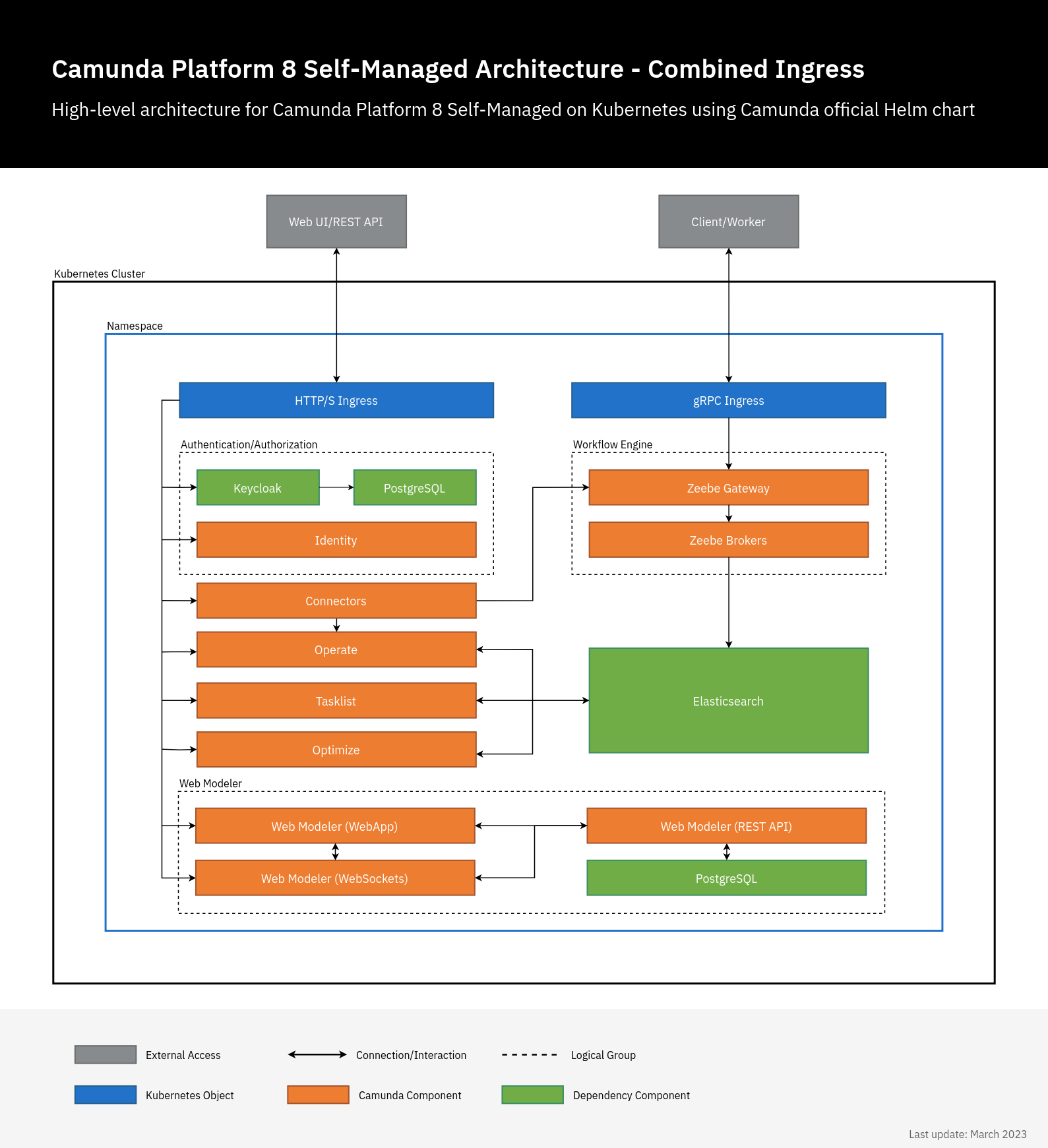
Below diagrams represent a summary view of the resources provisioned to support this program: Camunda + Kubernetes Playground.
The resources are subject to the security principles that are typically applied to public cloud environments.
Each participant will be granted access to use them for the duration of this program.
- Logical View: represents the list of services that compose of the end to end solution
- Physical View: guides you to envisage the physical layout and the flow of transactions and control as you build the platform from the base.
- A comprehensive list of all “user accounts” referred to during this program.
Be aware that security controls are applied to ensure safe access is extended to each participant. If you have any questions, please contact the Program Coordinator.
Physical Architecture

| Base Server OS Linux VM | FQDN: c8-<xyz>.makelabs.inHostname: c8-<xyz>xyz = generic name such as city name (hampi, peru, nyc) or fruit name (mango) or color (blue) or chemical periodic table (cobalt) Specification: Ubuntu Pro version 24.04 20 vCPU 32 GB RAM 100 GB Disk space GUI available: yes Command Line Shell: bash |
| kubernetes-local cluster | Consists of four virtual nodes. All the nodes share the same underlying resources of the base OS – as shown above |
| Namespaces within the cluster | elastic c86-mini Note: We will be creating these during the hands on labs. |
| Chrome Remote Desktop | Remote access software |
| Lab instructions and test scripts | Portal site – cep-now.makelabs.in |
| Supporting apps | Postman (on cloud) Docker site (access token to pull images from the docker repository) Gmail account (for Chrome Remote acccess) |
Application Architecture
| Name | Details | Security Controls |
|---|---|---|
| External Access | Cloudflare (Handling domain such as makelabs.in, security and routing) | Program Coordinator |
| Compute Layer | Ubuntu Pro VM on GCP Hosting server apps – Rancher Desktop by SUSE: Local kubernetes cluster with 4 virtual nodes – Project Lens IDE for kubernetes Note: These two apps are pre-installed and configured on the provisioned Linux VM. | Participant & Program Coordinator |
| Application Layer | Below apps are deployed to the kubernetes-local env.– Camunda self-managed 8.7.0-alpha4 with Keycloak for User Access Management– Elasticsearch 8.5.1 and Kibana – Prometheus and Grafana | Participant |
All Pods View
At the end of deploying the requisite apps, you should see below set of pods running in the local cluster.

All User Accounts
Below are the comprehensive set of user accounts that are used in this program.
| Component | Accessible via Internet (External Access) | User-id | Notes |
| Ubuntu Pro Linux VM | Yes | ubuntu raghu | For majority of the steps, you will be using the account “raghu”. The popup windows ask for password associated with user account “ubuntu”. Example – access to Default ring, saving user preferences etc. |
| Ubuntu Pro Linux VM | Yes | 6 digit number | To sign in via Chrome Remote Desktop |
| Elastic and Kibana | No | elastic | |
| Camunda Webapps: – Operate – Tasklist – Optimize | Yes | demo | |
| Camunda Keycloak (User Management) | Yes | admin | Keycloak administration account |
| Camunda Connectors (inbound webhook) | Yes | — | Secured via x-pi-key |
| Grafana | No | admin | Password is auto generated. Refer to Part 4 for more details. |